Big Data Analysis Enabler
✅ About BDAE(Big Data Analysis Enabler, AI Enabler) for Oracle Database
Big Data Analysis Enabler(BDAE) enables parallel processing of various AI-related R and Python modules without data movement based on Oracle Instance(s). Because it implements the Oracle Data Cartridge Interface, it is not limited to a specific schema and supports Dynamic SQL.
(contact : gracesjy@naver.com)
This is built on Oracle In-Database technology and has platform features that enable Oracle Database to be used not only as a simple storage for general AI tasks, but also as a non-stop operating environment without the overhead of data movement during learning and inference.
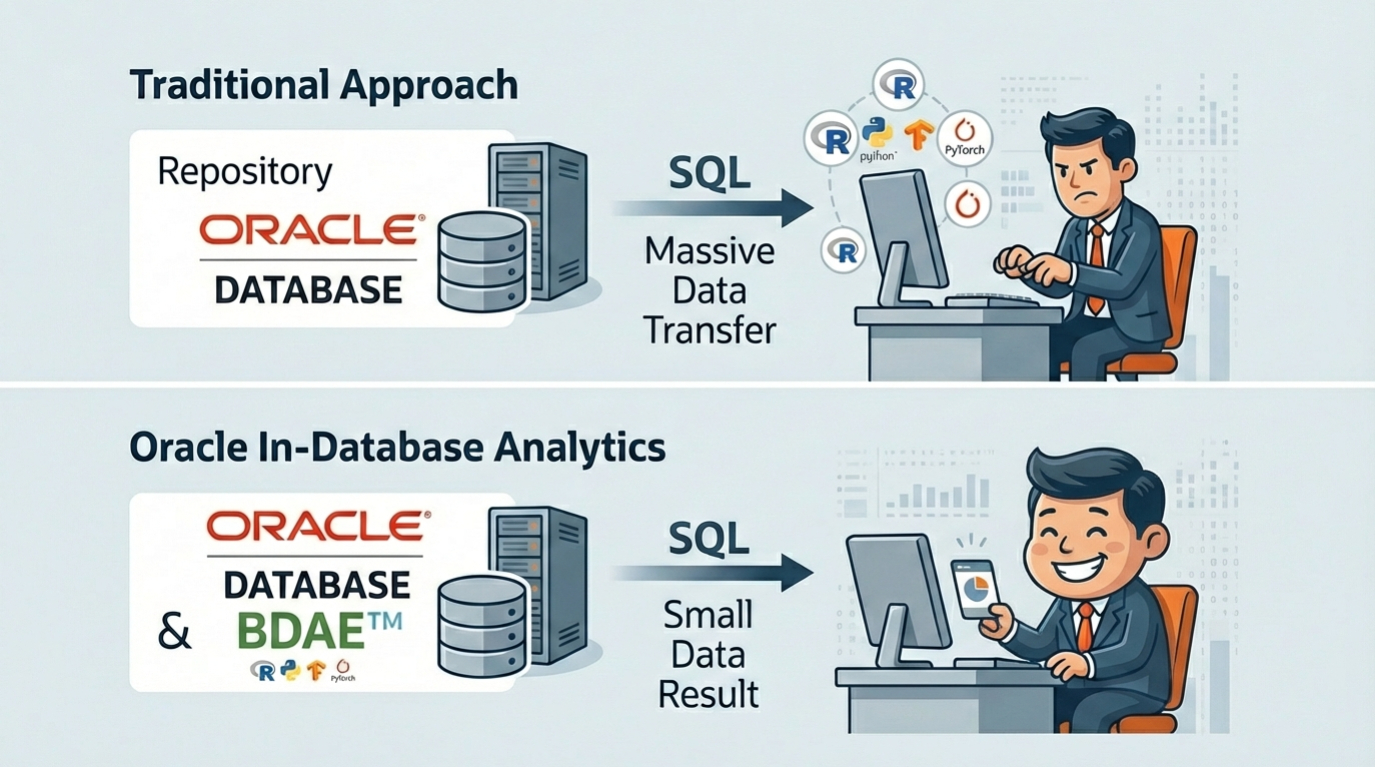
Below Image shows the operating location of BDAE in the form of Oracle In-Database. Parallel distributed processing is a feature of Oracle In-Database, and analysts do not need to consider it in their modules, which increases the reusability of logic. In addition, the fact that it can be integrated with various analysis engines can be seen as an advantage of BDAE.
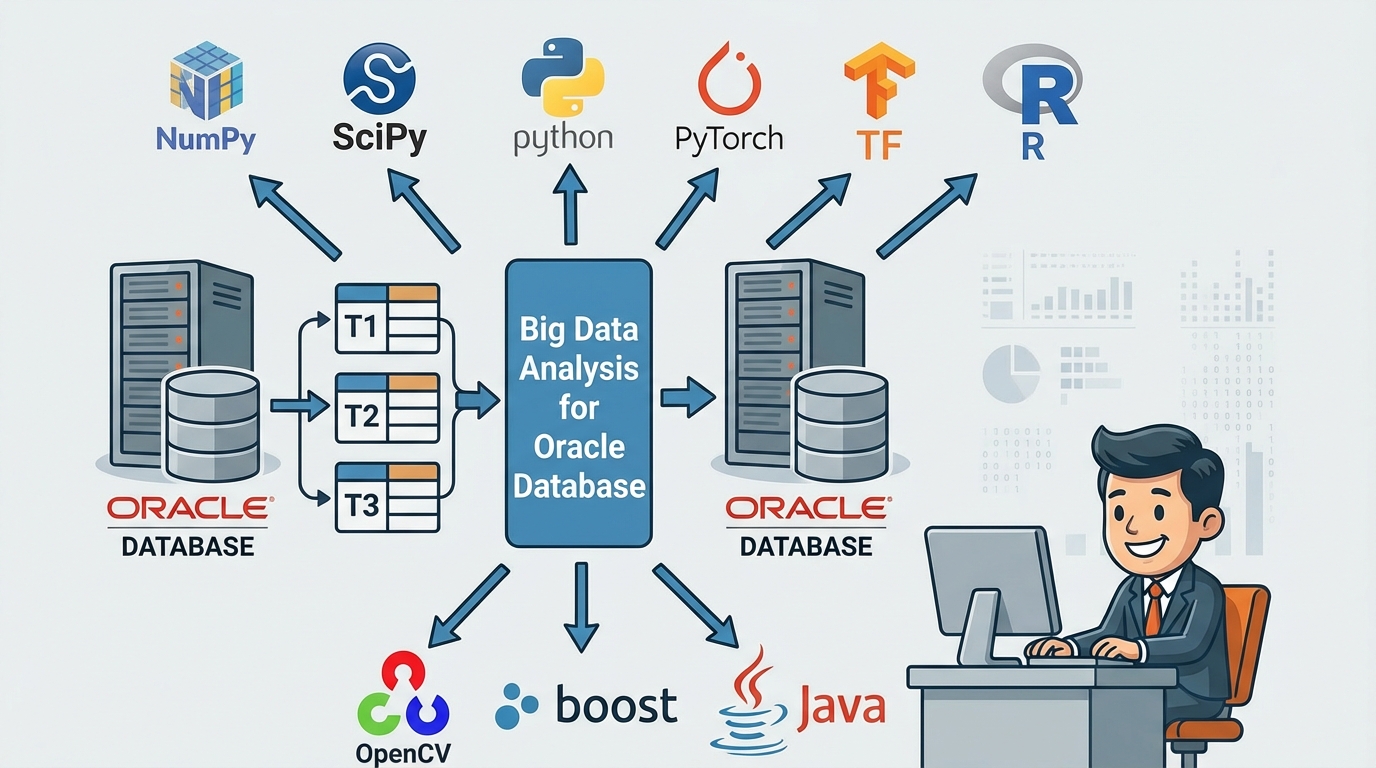
This can improve performance by reducing the number of DB calls while writing backend programs in Python and R.
Note)
- BDAE was developed with inspiration from Oracle R Enterprise and was created solely using Oracle manuals. However, it took a lot of time to develop through trial and error due to the lack of examples.
- BDAE enables your Python/R modules to run with parallelism like Oracle R Enterprise.
- But, BDAE has no alogithm unlike Oracle R Enterprise, just tool for AI (Machine Learning).
Algorithms are not included because they are constantly evolving and changing. This is also because analysts can do better. - Embedded Python/R execution provides some of the most significant advantages of using BDAE. Using embedded Python/R execution,
you can store and run Python/R scripts in the database through either an Python/R interface or a SQL interface or both.
You can use the results of Python/R scripts in SQL-enabled tools for structured data, Python/R objects, and images.
📌 BDAE Table Functions
BDAE has special SQL statements related to Oracle In-Database and provides table functions for four types of analysis for Python and R respectively. The function names were intentionally designed to be similar to those in Oracle R Enterprise, as a tribute to the inspiration they provided. Of course, the names themselves are not fixed and can be changed if needed.
- apEval(SQL_args, SQL_output, PythonModuleName:start_function)
- apTableEval(SQL_input, SQL_args, SQL_output, PythonModuleName:start_function)
- apRowEval(SQL_input, SQL_args, SQL_output, No_of_Rows, PythonModuleName:start_function)
- apGroupEval(SQL_input, SQL_args, SQL_output, GroupColumns, PythonModuleName:start_function)
- asEval(SQL_args, SQL_output, R_script_name)
- asTableEval(SQL_input, SQL_args, SQL_output, R_script_name)
- asRowEval(SQL_input, SQL_args, SQL_output, No_of_Rows, R_script_name)
- asGroupEval(SQL_input, SQL_args, SQL_output, GroupColumns, R_script_name)
apEval() is for simple testing without input data, while the rest all have input data. Each can be used for its own purpose, and the R and Python analysis modules are reusable.
The most commonly used ones are apTableEval() and apGroupEval(), and the difference between the two is that apGroupEval has Group By built-in, allowing for parallel distributed processing.
- SQL_input : is a SQL statement describing the data to be analyzed and must be independently executed and queried.
- SQL_args : can represent hyperparameters or reference data for the analysis module. For example, hyperparameters can be expressed as follows:
1
select 0.000001 learning_rate, 100 epochs from dual
SQL_output : is the part where you enter the SQL statement for output or the View or Table name, and the type and number of columns must match the data.frame or pandas DataFrame in the return part of the R or Python analysis module.
- No_of_Rows : means that the SQL_input data is split into each defined number and the analysis module is called and executed.
- R_script_name/PythonModuleName:start_function : is where you enter the names of the registered R and Python modules you want to analyze. They are all managed in separate tables, and unlike R, Python is slightly different in the parts where you write the module name and the function name to start execution.
- GroupColumns : applies only to apGroupEval() and is equivalent to inserting Group By in a SQL statement into the apTableEval() function. In other words, apGroupEval() defines that parallel distributed processing is performed based on these columns, and each column name can be written as col1, col2, col3, .. Therefore, analysts do not need to consider parallel distributed processing.
✅ How To run (3 Steps to Run !)
🧠 1. Register your Python/R model in the designated Oracle Database’s table or save file in PYTHONPATH directory.
Since both Python and R can be installed in the Anaconda environment, you can develop in a jupyter notebook and copy and move it to BDAE Web.
🧠 2. Register the SQL to bind source data and your model.
This involves creating SQL statements that bind the data (ML, DL, etc.) you want to use for AI tasks. It’s helpful to use an LLM like ChatGPT for this.
🧠 3. Run the SQL and get the results. you can get results any tools capable of connecting Oracle Database.
The advantage of BDAE is that it can be used as a client that can connect to any Oracle DB because all of these executions are done with SQL statements.
Note Using BDAE Web, you can simply and easily register Python/R and SQLs with Editor. (just copy & paste from Jupyter Notebook or Something)
Step-1) Make Your Python module (ML/DL/ …)
You must make entry function of module, for example describe(). others are helper functions.
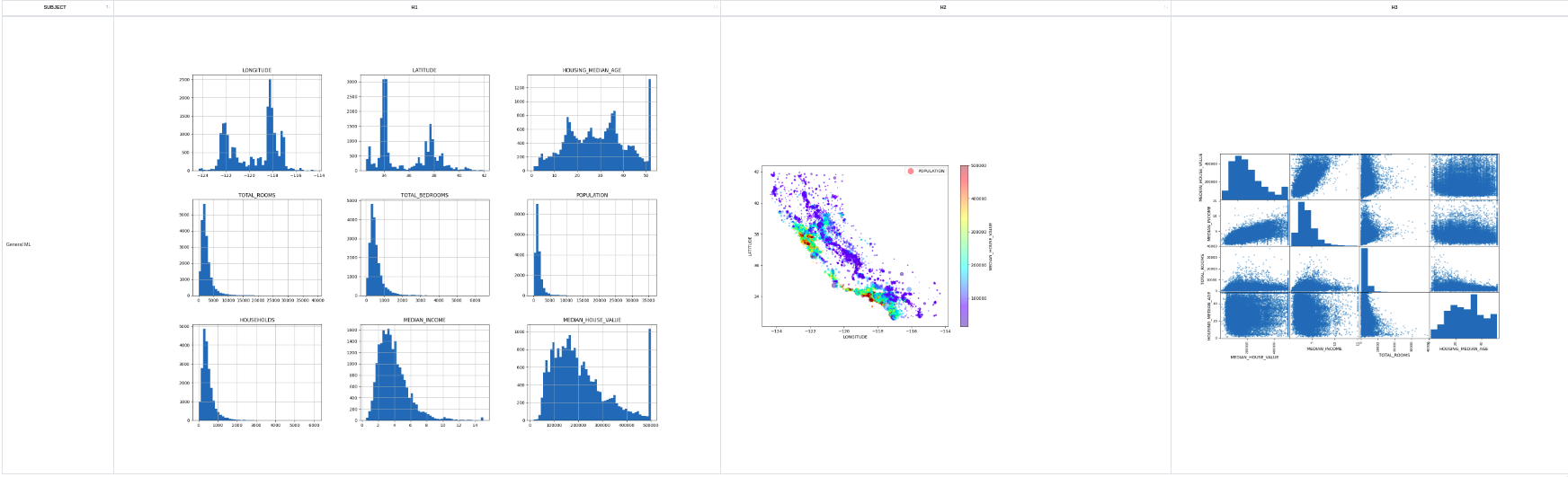
💡This example is intentionally included to demonstrate the return of images, as images may be included in Machine Learning or Deep Learning Training or Inference.
1
2
3
4
5
6
7
8
9
10
11
12
13
14
15
16
17
18
19
20
21
22
23
24
25
26
27
28
29
30
31
32
33
34
35
36
37
38
39
40
41
42
43
44
45
46
47
48
49
50
51
52
53
import numpy as np
import os
import matplotlib as mpl
import matplotlib.pyplot as plt
import pandas as pd
import tempfile
import base64
from pandas.plotting import scatter_matrix

def make_output(df, key, data):
   df[key] = data
   return df

def image_to_html():
   tmp_file_name = tempfile.NamedTemporaryFile().name + '.png'
   plt.savefig(tmp_file_name)
   image = open(tmp_file_name, 'rb')
   image_read = image.read()
   image_64_encode = base64.b64encode(image_read)
   uri = '<img src="data:img/png;base64,' + image_64_encode.decode() + '">'
   html_str = "<html><body>" + uri + "</body></html>"
   if os.path.exists(tmp_file_name):
      os.remove(tmp_file_name)
   return html_str

# start function : df_house supplied by BDAE automatically.
def describe(df_housing):
   # 0) Prepare Output
   tupleStart = {'subject': [ 'General ML' ] }
   pdf = pd.DataFrame(tupleStart)

   # 1) Historam
   df_housing.hist(bins=50, figsize=(20,15))
   a = image_to_html()
   pdf = make_output(pdf, 'Histogram', a)

   # 2) Scatter Plot
   df_housing.plot(kind="scatter", x="LONGITUDE", y="LATITUDE", alpha=0.4,
             s=df_housing["POPULATION"]/100, label="POPULATION", figsize=(10,7),
             c="MEDIAN_HOUSE_VALUE", cmap=plt.get_cmap("jet"), colorbar=True,
             sharex=False)
   plt.legend()
   a = image_to_html()
   pdf = make_output(pdf, 'ScatterPlot', a)

   # 3) Scatter Matrix
   attributes = ["MEDIAN_HOUSE_VALUE", "MEDIAN_INCOME", "TOTAL_ROOMS",
              "HOUSING_MEDIAN_AGE"]
   scatter_matrix(housing[attributes], figsize=(12, 8))
   a = image_to_html()
   pdf = make_output(pdf, 'ScatterMatrix', a)

   return pdf
Step-2) Make Your SQL to run
The input (Oracle Database’s Table or View or Queries) is delivered pandas DataFrame format to your python entry point function, and You must make the results into pandas DataFrame format !, because of Oracle Database Query Results(RDBMS).
💡Because the Oracle Database Engine creates a plan for input SQL and output SQL before execution, you must also explicitly pass the output format.
1
2
3
4
5
6
7
8
9
10
11
12
13
SELECT *
FROM table(
    apTableEval(
        cursor(SELECT * FROM CAL_HOUSING),  ------------ 🧩 Input Data (Driving Table)
        NULL,                               ------------ 🧩 Secondary Input Data
        'SELECT CAST(''A'' AS VARCHAR2(40)) SUBJECT,  -- 🧩 Output Format
                TO_CLOB(NULL) H1,
                TO_CLOB(NULL) H2,
                TO_CLOB(NULL) H3
         FROM DUAL',
        'CAL_HOUSING_EDM:describe'          ------------ 🧩 Python Module for calling
    )
);
Step-3) Run above SQL and get Results
Like General SQL Queries’ results, BDAE’s results are the same. (Any Applications you can develope using SQLs)
🛠️ Installation
Oracle Database is provided as Docker, and installation of Python and R with Anaconda has also become very convenient. Therefore, BDAE installation is very quick and can be installed within 5 minutes.
However, the installation will be long and tedious if it is described in terms of Oracle Database and OS, so I will omit it. So we provide Docker.
This Docker can be provided in Docker tar file format and can be imported to your computer using following method.
⚠️ If you have a GPU, you can enter –gpus all –ipc=host as shown below. Use –ipc=host when you are not sure of the memory limit.
1
2
3
> docker load -i bdae_oracle.tar<br>
> docker run -d --init --hostname=ol8 --ipc=host --name oracle_bdae_gpu --gpus all
   -p 1521:1521 -p 5500:5500 -p 8888:8888 oracle_bdae_19c:0.7.5
Please send me the mail if you want to test. (gracesjy@naver.com)
✅ Summary Document(Manual)
Big Data Analysis Enabler Summary(Korean)
Big Data Analysis Enabler Summary(English)
✅ Where to use ..
🧠 1. Improved and simplified Backend performance
Instead of the backend calling SQL statements to Oracle Database multiple times, BDAE is used to obtain the same result in a single SQL statement call.
🧠 2. Unlike BigQuery on GCP, you can create models and perform inferences by tuning data and deciding on algorithms yourself. ( Cons and Pros )
🧠 3. Freely create MS Office files in a format that matches the data from various tables in the Oracle Database.
🧠 4. There is no need to consider Parallel Distributed Processing, and preprocessing fully utilizes Oracle Database to improve performance.
🧠 5. Python and R codes exist in the DB and can be applied immediately without your code modification.
🧠 6. Increase system efficiency by using GPU instead of CPU during analysis process.
🧠 7. Maximize the stability and performance of Oracle Database, focus solely on analysis itself, and eliminate complexity.
✅ Examples
📝 Example #1 (YOLO Aquarium Training, Object Detection)
Aquarium Object Detection Training
Python Source (YOLOv8:train saved into BDAE PYSCRIPT Table)
Train Data from Roboflow Aquarium, YOLO v8 model trained using NVIDIA GTX3060(12GB)
1
2
3
4
5
6
7
8
9
10
11
12
13
14
15
16
17
18
19
20
21
22
23
24
25
26
27
28
29
30
31
32
33
34
35
36
37
38
39
40
41
42
43
44
45
46
47
48
49
50
51
52
53
54
55
56
57
58
59
60
61
62
63
64
65
66
from ultralytics import YOLO
import pandas as pd
import numpy as np
import os
os.environ['KMP_DUPLICATE_LIB_OK']='TRUE'
os.environ['PYTHONIOENCODING']='UTF-8'
import logging, logging.handlers
import sys
import base64
from os import listdir
from os.path import isfile, join
from StreamToLogger import StreamToLogger
import logging, logging.handlers

# comment
file_loc = []

def yolo_callback(x):
    print("yolo callback called !")
    file_loc.append(str(x))


def image_to_html(filename):
    image = open(filename, 'rb')
    image_read = image.read()
    image_64_encode = base64.b64encode(image_read)
    uri = '<img src="data:img/png;base64,' + image_64_encode.decode() + '">'
    html_str = "<html><body>" + uri + "</body></html>"
    return html_str

def train(df_args):
    logger = logging.getLogger('AquaModelByYOLOv8:train')
    logger.setLevel(logging.DEBUG)

    socketHandler = logging.handlers.SocketHandler('localhost',
                    logging.handlers.DEFAULT_TCP_LOGGING_PORT)

    logger.addHandler(socketHandler)

    sys.stdout = StreamToLogger(logger,logging.INFO)
    sys.stderr = StreamToLogger(logger,logging.ERROR)

    print("----- Aqua Object Detection by YOLOv8 start ------")
    model = YOLO("yolov8n.pt")
    # result = model.train(data='/home/oracle/DeepLearning/Aquarium_Combined.v2-raw-1024.yolov8/data.yaml', epochs=10,patience=30,batch=16,imgsz=416)
    result = model.train(data=df_args['PATH'], epochs=10,patience=30,batch=16,imgsz=416)
    result_dir = str(result.save_dir)
    result_chart_data = []
    result_chart_name = []

    onlyfiles = [f for f in listdir(result_dir) if isfile(join(result_dir, f))]
    print(onlyfiles)

    for i in range(len(onlyfiles)):
        if onlyfiles[i].lower().endswith(('.png', '.jpg', '.jpeg')) == True:
            result_chart_name.append(onlyfiles[i])
            print('before open file : ' + result_dir + '/' + onlyfiles[i])
            result_chart_data.append(image_to_html(result_dir + '/' + onlyfiles[i]))

    #result.confusion_matrix.plot(normalize=True, save_dir='/tmp', names=(list(model.names.values())), on_plot=yolo_callback)
    #cm_chart_clob = image_to_html(file_loc[0])

    dictData = {'Chart Name': result_chart_name, 'Chart': result_chart_data }
    print("----- Aqua Object Detection by YOLOv8 end ------")
    pdf = pd.DataFrame(dictData)
    return pdf
BDAE SQL for inference
1
2
3
4
5
SELECT *
FROM table(apEval(
   cursor(SELECT '/home/oracle/DeepLearning/Aquarium_Combined.v2-raw-1024.yolov8/data.yaml' PATH FROM dual),
   'SELECT CAST(NULL AS VARCHAR2(400)) CHART_NAME, TO_CLOB(NULL) CHART_DATA FROM dual',
   'YOLOv8:train'))
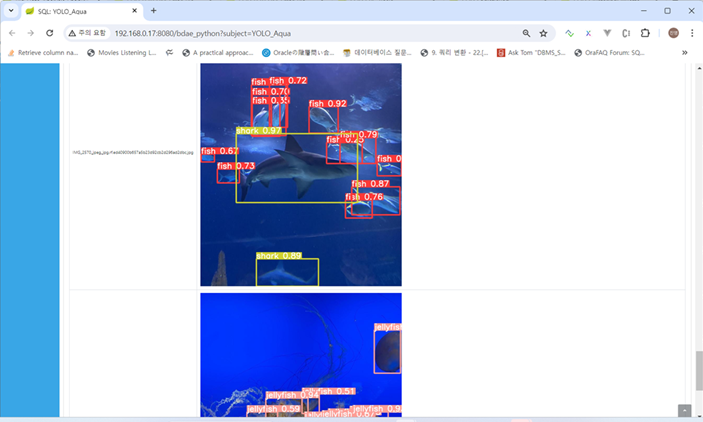
📝 Example #2 (YOLO Aquarium Inference)
Aquarium Object Detection Inference
Python
Serialized Model already saved into Oracle dedicated table(MODEL_SAVING_TBL), BLOB type,
so for inference, use this Model.
1
2
3
4
5
6
7
8
9
10
11
12
13
14
15
16
17
18
19
20
21
22
23
24
25
26
27
28
29
30
31
32
33
34
35
36
37
38
39
40
41
42
43
44
45
46
47
48
49
50
51
52
53
54
55
56
57
58
59
60
61
62
63
64
65
66
67
68
69
70
71
72
73
74
75
76
77
78
79
80
81
82
83
84
85
86
87
88
89
90
91
92
93
import numpy as np
import pandas as pd
import matplotlib
import gc
matplotlib.use('Agg')
import matplotlib.pyplot as plt
from matplotlib import style
import os
import sys
import urllib
import base64
from ultralytics import YOLO
import cv2
import matplotlib.pyplot as plt
import os
import subprocess
import cv2
import sys
import urllib
import base64
import pandas as pd
import _pickle as cPickle
import tempfile
import logging
from StreamToLogger import StreamToLogger
import logging, logging.handlers

os.environ['PROTOCOL_BUFFERS_PYTHON_IMPLEMENTATION']='python'

def image_to_html():
    tmp_file_name = tempfile.NamedTemporaryFile().name + '.png'
    plt.savefig(tmp_file_name)
    image = open(tmp_file_name, 'rb')
    image_read = image.read()
    image_64_encode = base64.b64encode(image_read)
    uri = '<img src="data:img/png;base64,' + image_64_encode.decode() + '">'
    html_str = "<html><body>" + uri + "</body></html>"
    if os.path.exists(tmp_file_name):
        os.remove(tmp_file_name)
    return html_str

def make_output(df, key, data):
    df[key] = data
    return df

def predict_aqua(df_data, df_model):
    logger = logging.getLogger('YOLOv8:predict_aqua')
    logger.setLevel(logging.DEBUG)

    socketHandler = logging.handlers.SocketHandler('localhost',
                   logging.handlers.DEFAULT_TCP_LOGGING_PORT)

    logger.addHandler(socketHandler)

    sys.stdout = StreamToLogger(logger,logging.INFO)
    sys.stderr = StreamToLogger(logger,logging.ERROR)

    print('--- columns ----'  + str(df_model.columns))
    print(str(df_model.head()))
    print(str(df_data.head()))

    model_binary = df_model['RAWDATA'][0]
    tmp_file_name = tempfile.NamedTemporaryFile().name + '.pt'
    print('file_name : ' + tmp_file_name)
    with open(tmp_file_name, "wb") as f:
        f.write(model_binary)
        f.close()

    print('before loading model')
    model = YOLO(tmp_file_name)
    print('before test data location ....' )
    source_data = df_data['DATA'][0]
    print('after test data location ....' + source_data )
    results = model.predict(source=source_data, save=True)
    print('after prediction ...')
    base64_list = []
    filelist = []
    for result in results:
        filename = os.path.basename(result.path).split('/')[-1]
        fullpathfilename = os.getcwd() + '/' + result.save_dir + '/' + filename
        image = open(fullpathfilename, 'rb')
        image_read = image.read()
        image_64_encode = base64.b64encode(image_read)
        uri = '<img src="data:img/png;base64,' + image_64_encode.decode() + '">'
        total = "<html><body>" + uri + "</body></html>"
        base64_list.append(total)
        filelist.append(filename)

    print(str(filelist))
    tupleStart = {'file name': filelist, 'images': base64_list }
    pdf = pd.DataFrame(tupleStart)
    return pdf
BDAE SQL for inference
The trained Model already saved in the MODEL_SAVING_TBL, the inferece uses this.
1
2
3
4
5
6
7
8
9
10
SELECT *
FROM table(apTableEval(
   cursor(SELECT '/home/oracle/DeepLearning/Aquarium_Combined.v2-raw-1024.yolov8/test/images' AS DATA FROM dual),
   cursor(SELECT MODEL_NAME AS KEY,
                 MODEL_DATA AS RAWDATA,
                 APPLY_YN AS YN
          FROM MODEL_SAVING_TBL
          WHERE MODEL_NAME='yolov8_aqua_model'),
   'SELECT CAST(NULL AS VARCHAR2(120)) FileName, TO_CLOB(NULL) Image FROM dual',
   'YOLOv8:predict_aqua'))
Result
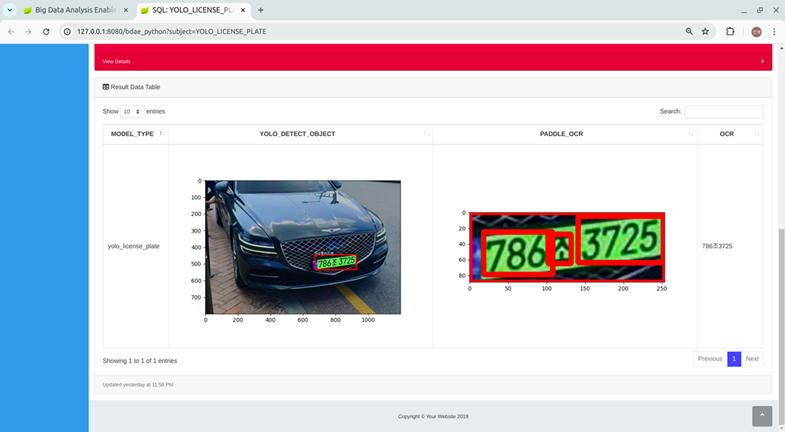
📝 Example #3 (YOLO License Plate OCR Inference)
License Plate OCR Inference
Python Code
2 Packages used, YOLO for Object Detection (Licese Plate location in the cars) + PaddleOCR
Train Data from Roboflow cars, YOLO v8 model trained using NVIDIA GTX3060(12GB)
1
2
3
4
5
6
7
8
9
10
11
12
13
14
15
16
17
18
19
20
21
22
23
24
25
26
27
28
29
30
31
32
33
34
35
36
37
38
39
40
41
42
43
44
45
46
47
48
49
50
51
52
53
54
55
56
57
58
59
60
61
62
63
64
65
66
67
68
69
import numpy as np
import pandas as pd
import matplotlib
import gc
matplotlib.use('Agg')
import matplotlib.pyplot as plt
from matplotlib import style
import os
import sys
import urllib
import base64
from ultralytics import YOLO
import cv2
import matplotlib.pyplot as plt
import os
import subprocess
import cv2
import os
os.environ['PROTOCOL_BUFFERS_PYTHON_IMPLEMENTATION']='python'
from paddleocr import PaddleOCR

def predict():
    os.chdir('/home/oracle/yolo')
    model = YOLO('/home/oracle/yolo/yolo_license_plate.pt')
    img = cv2.imread('/home/oracle/yolo/car_2.jpg')
    results = model.predict(img, save=False, conf=0.5)
    color1 = (155, 200, 230)
    img_crop = None
    for result in results:
        boxes = result.boxes.cpu().numpy()  # Get boxes on CPU in numpy format
        for box in boxes:
            r = box.xyxy[0].astype(int)
            class_id = int(box.cls[0])  # Get class ID
            class_name = model.names[class_id]  # Get class name using the class ID
            cv2.rectangle(img, r[:2], r[2:], (0, 255, 0), 2)  # Draw boxes on the image
            cv2.putText(img, class_name, (r[0], r[1]), 1, 2, color1, 2, cv2.LINE_AA)
            img_crop = img[r[:2], r[2:]].copy()
    plt.imshow(img)
    plt.savefig('/tmp/result.png')
    img_crop =  img[r[1]:r[3], r[0]:r[2]].copy()
    ocr = PaddleOCR(lang="korean")
    result = ocr.ocr(img_crop, cls=False)
    ocr_result = result[0]
    license_x = ''
    for rectObj in ocr_result:
        for rect in rectObj:
            if isinstance(rect, list):
                pt1 = tuple([int(s) for s in rect[0]])
                pt2 = (int(rect[1][0]), int(rect[3][1]))
            if isinstance(rect, tuple):
                license_x = license_x + rect[0]

    image = open('/tmp/result.png', 'rb')
    image_read = image.read()
    image_64_encode = base64.b64encode(image_read)
    print(type(image_64_encode))

    uri = '<img src="data:img/png;base64,' + image_64_encode.decode() + '">'
    total = "<html><body>" + uri + "</body></html>"

    color1 = (155, 200, 230)
    list_data1 = [1]
    list_data2 = [2]
    list_data3 = [total]
    list_data4 = [license_x]
    #list_data4 = [license_x]
    datax ={'Estimate No. Clusters': list_data1, 'Homogeneity': list_data2, 'IMG' : list_data3, 'OCR': list_data4}
    pdf = pd.DataFrame(datax)
    return (pdf)
BDAE SQL for inference
1
2
3
4
5
6
7
8
9
10
11
12
SELECT *
      FROM table(apTableEval(
            cursor(SELECT '/home/oracle/Downloads/20240428_175815.jpg' AS DATA FROM dual),
            cursor(SELECT MODEL_NAME AS KEY,
                          MODEL_DATA AS RAWDATA,
                          APPLY_YN AS YN
                   FROM MODEL_SAVING_TBL
                   WHERE MODEL_NAME='yolo_license_plate'
            'SELECT CAST(NULL AS VARCHAR2(40)) MODEL_TYPE, TO_CLOB(NULL) YOLO_Detect_Object,
                     TO_CLOB(NULL) PADDLE_OCR,
                   CAST(NULL AS   VARCHAR2(40)) OCR FROM dual',
           'YOLOv8:predict_with_model'))
Result