SLAM Robot Project: From Firmware to Navigation
##
1. Uploading Firmware to ESP32
Before running ROS 2 nodes, ensure the micro-ROS firmware is running on your robot’s controller. Open the micro-ROS project in your IDE (e.g., Arduino IDE or PlatformIO). Configure your WiFi SSID/Password and the PC IP Address (Agent IP). Set the Agent Port to 8090. 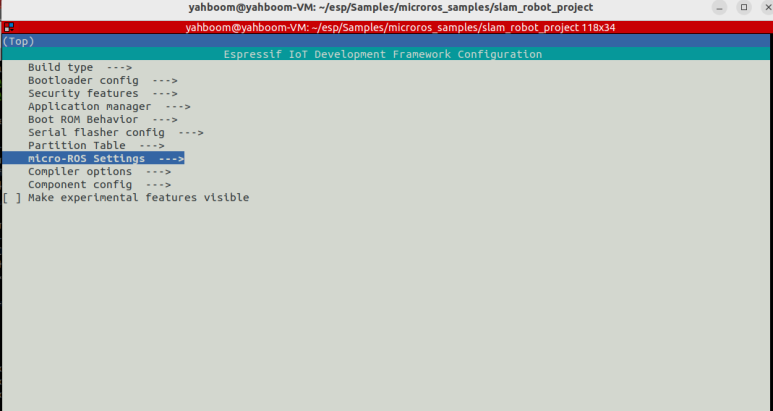
1
2
3
$ source ~/esp/esp-idf/export.sh
$ idf.py set-target esp32s3
$ idf.py menuconfig
Flash the code to the ESP32 board.
1
2
$ idf.py flash monitor
$ idf.py -p /dev/ttyUSB0 flash monitor  # port
2. Start micro-ROS Agent
The agent acts as a bridge between the robot (ESP32) and the ROS 2 environment.
Terminal 1
1
2
3
source ~/uros_ws/install/setup.bash
export ROS_DOMAIN_ID=15
ros2 run micro_ros_agent micro_ros_agent udp4 --port 8090
3. Manual Control Test
Check the communication by moving the robot using your keyboard. Terminal 2
1
2
export ROS_DOMAIN_ID=15
ros2 run teleop_twist_keyboard teleop_twist_keyboard
4. SLAM (Map Building)
Generate a 2D map of your environment using LiDAR data. Terminal 3: Run Gmapping
1
2
3
4
cd ~/gmapping_ws
source install/setup.bash
export ROS_DOMAIN_ID=15
ros2 launch slam_gmapping slam_gmapping.launch.py
Terminal 4: Visualization
1
2
export ROS_DOMAIN_ID=15
rviz2
In RViz2: Set Fixed Frame to map. Add Map and LaserScan displays. Action: Move the robot slowly using the keyboard to fill the map.
5. Saving the Map
Once the map is complete, save it to files (.yaml and .pgm).
Terminal 5
1
2
export ROS_DOMAIN_ID=15
ros2 run nav2_map_server map_saver_cli -f ~/my_new_map
6. Autonomous Navigation
Use the saved map to let the robot navigate by itself.
Stop the SLAM and Teleop nodes (Ctrl+C).
Run Navigation:
Terminal 6, for simple navigation.
1
2
export ROS_DOMAIN_ID=15
ros2 launch nav2_bringup bringup_launch.py map:=/home/go/my_maps/my_2nd_map.yaml
You may edit your own navigation params.
1
2
3
4
5
6
7
mkdir -p ~/navi
cp $(ros2 pkg prefix nav2_bringup)/share/nav2_bringup/params/nav2_params.yaml ~/navi/my_nav2_params.yaml
vi ~/navi/my_nav2_params.yaml # for detail

# for navigation
ros2 launch nav2_bringup bringup_launch.py use_sim_time:=False params_file:=/home/go/navi/my_nav2_params.yaml map:=/home/go/my_maps/my_2nd_map.yaml
1
ros2 run rviz2 rviz2 -d $(ros2 pkg prefix nav2_bringup)/share/nav2_bringup/rviz/nav2_default_view.rviz
In RViz2:
Use 2D Pose Estimate to align the robot’s current position on the map. Use Nav2 Goal to set a destination. The robot will move autonomously.