Balancing Robot Final
Why is STM32 the Superior Choice for Balancing Robots?
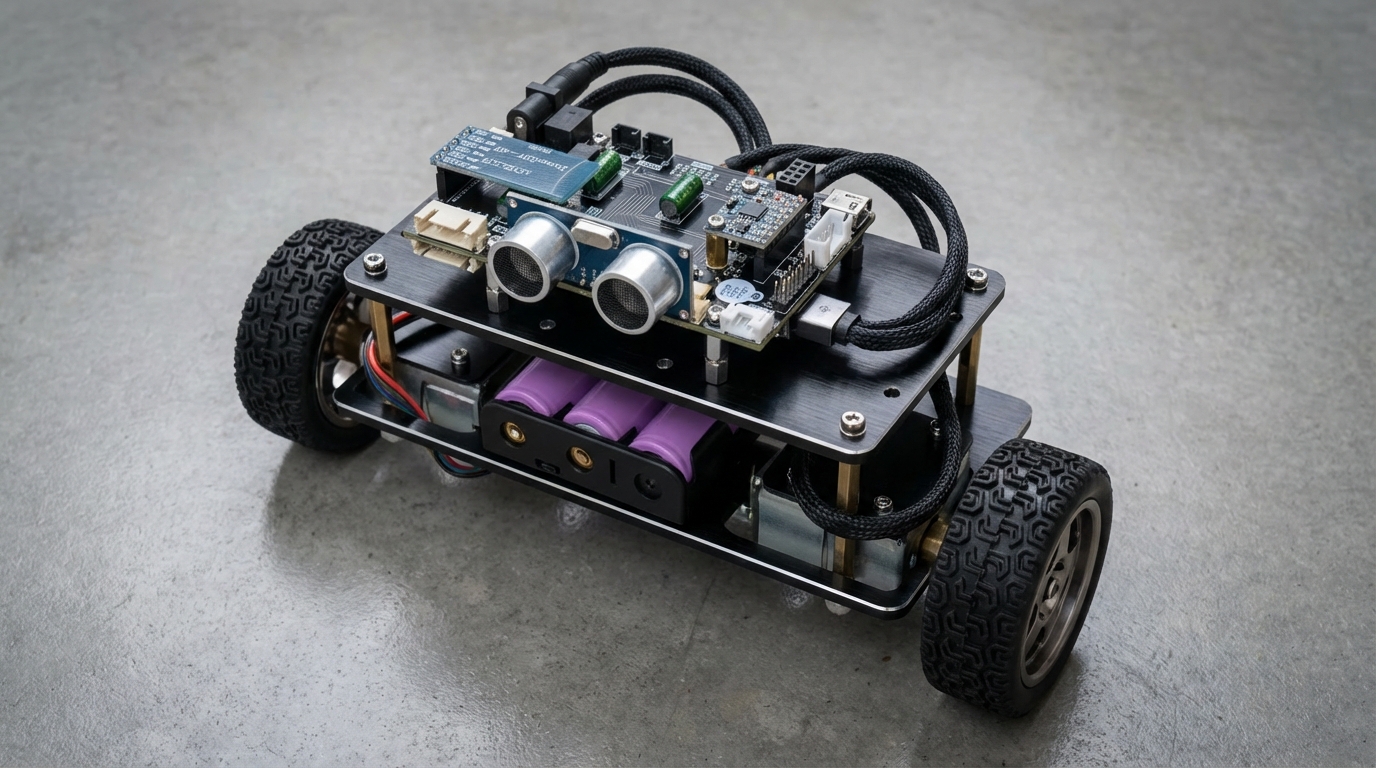
1. Instantaneous Response (Interrupt Efficiency)
The Arduino Uno handles the process of saving registers during an interrupt via software, which creates significant overhead. In contrast, the STM32 utilizes a hardware-based NVIC (Nested Vectored Interrupt Controller). This allows the system to respond to external signals almost instantly, ensuring the robot never misses that critical split-second when it begins to tilt.
2. Superior Floating-Point Processing
PID control algorithms rely heavily on decimal (floating-point) calculations. Since the 8-bit Uno must emulate these calculations through software, its processing time increases significantly. The 32-bit STM32 handles much larger data sets in a single cycle, drastically reducing the “Loop Time” and enabling much smoother, more precise motor adjustments.
3. Dedicated Hardware Resource Allocation
- Arduino Uno: When attempting to send motor control signals (PWM) while simultaneously reading encoder pulses, the CPU struggles to juggle both tasks, often leading to calculation bottlenecks.
- STM32: It features dedicated hardware timers that count encoder pulses independently of the CPU. This offloads the mundane task of tracking wheel position to the hardware, allowing the CPU to focus 100% of its power on the core balancing logic.
💡 Conclusion: While the Arduino Uno is an excellent tool for basic education and simple prototyping, the STM32 is an absolute necessity if your goal is a high-performance balancing robot that moves smoothly without jitters or vibrations.
📊 Arduino Uno vs. STM32: In-depth Comparison of Performance and Real-time Responsiveness
In precision control systems like balancing robots, the “stamina” (processing power) and “reflexes” (responsiveness) of the MCU are critical factors for success. Here is a data-driven comparison highlighting the limitations of 8-bit systems versus the power of 32-bit systems.
1. Comparison of Basic Hardware Specifications
These two boards belong to entirely different classes, from their architecture to their clock speeds.
| Feature | Arduino Uno (ATmega328P) | STM32 (F103C8T6) | Remarks |
|---|---|---|---|
| Core Architecture | 8-bit RISC (AVR) | 32-bit ARM Cortex-M3 | Difference in data processing units |
| Clock Speed | 16 MHz | 72 MHz | ~4.5x difference in calculation speed |
| SRAM | 2 KB | 20 KB | Capacity for complex algorithms |
| Operating Voltage | 5V | 3.3V | Better compatibility with modern sensors |
2. Response Speed and I/O Performance (Real-time Capability)
The stability of a balancing robot depends on “how quickly it can read sensor values and adjust the motors.”
| Performance Metric | Arduino Uno | STM32 | Performance Gap |
|---|---|---|---|
| Interrupt Latency | ~7 μs | ~0.2 μs | STM32 is ~35x faster |
| Digital I/O Toggle | ~4.5 μs | ~0.17 μs | Superior output signal precision |
| ADC Conversion Speed | ~112 μs | ~3.5 μs | Shorter sensor data update cycles |
| Encoder Processing | S/W Interrupt-based | H/W Timer Encoder Mode | Minimal CPU load |
3. Why STM32 is Dominant for Balancing Robots
① Lag-free Response (Interrupt Efficiency)
On the Arduino Uno, the process of saving registers during an interrupt is handled via software, making it “heavy” and slow. In contrast, the STM32 features a hardware-based NVIC (Nested Vectored Interrupt Controller) that responds instantly, ensuring the robot never misses the exact moment it begins to tilt.
② Floating-Point Calculation Capability
PID control requires constant decimal (floating-point) calculations. While the 8-bit Uno struggles with software-based emulation of these calculations—leading to longer loop times—the 32-bit STM32 processes larger numbers natively. This drastically reduces the loop time, resulting in much smoother control.
③ Efficient Allocation of Hardware Resources
- Arduino Uno: When sending motor control signals while simultaneously reading encoder data, the CPU must juggle both tasks, often leading to calculation bottlenecks.
- STM32: Dedicated Hardware Timers count encoder pulses in real-time without any CPU intervention. This allows the CPU to focus 100% of its resources on the PID calculations needed to maintain balance.
#💡 Conclusion: While the Arduino Uno is an excellent tool for educational prototyping, the STM32 is the ultimate choice if you want to build a high-precision balancing robot that eliminates fine vibrations.
μVision, ARM Keil (MDK_ARM) needed for development …
μVision is an Integrated Development Environment (IDE) created by Arm Keil. It is widely used for programming and debugging microcontrollers, especially those based on ARM Cortex-M processors. μVision provides everything developers need in one place: a code editor, compiler, project manager, and powerful debugging tools. With its simulation and hardware debugging support, it helps engineers design, test, and optimize embedded systems efficiently.

Keil μVision Community License
To develop under a Community License, you must configure your project to run on the AC6 compiler. This is because AC5 is a very expensive license, and temporary licenses only last for one month.
I contacted the manufacturer of the balancing robot board because they provided an AC5-based version, but they responded via email that they had no plans to port it to AC6 or an open-source IDE. This left me with several days to work with AI to resolve the issue. Fortunately, a solution was found.
At License Management Menu, Select Tab ‘User-Based License’, Click ‘Activate/Deactivate ..’ Button, Select License Server and type https://mdk-preview.keil.arm.com, and then push the ‘Query’ Button, That’s all.